Bank Account Aadhaar Seeding & NPCI DBT Mapping Guide
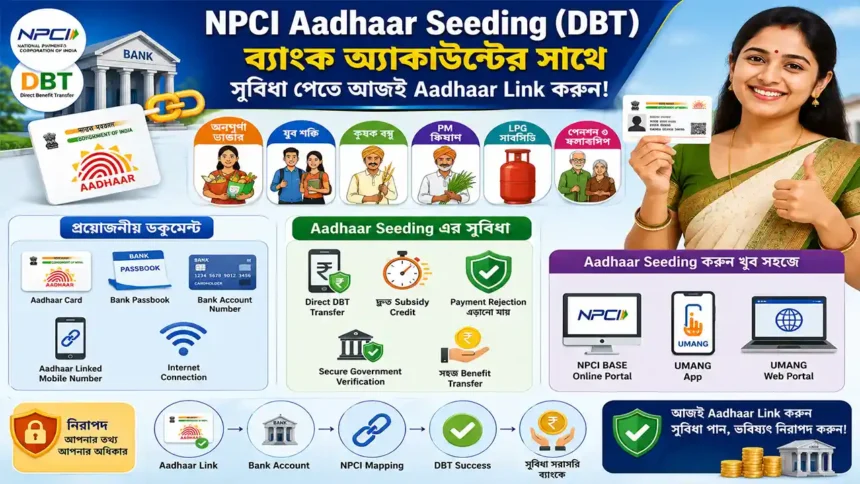
সরকার বর্তমানে বিভিন্ন Government Welfare Scheme এর সুবিধাভোগীদের জন্য Aadhaar Seeding এবং NPCI DBT Mapping অত্যন্ত গুরুত্বপূর্ণ করে তুলেছে। বিশেষ করে Annapurna Bhandar, Yuva Shakti, Krishak Bandhu, PM Kisan, LPG Gas Subsidy, Pension Scheme, Scholarship Scheme এবং অন্যান্য Direct Benefit Transfer (DBT) প্রোগ্রামের টাকা এখন সরাসরি Beneficiary এর Bank Account এ NPCI NPCI Aadhaar Seeding System এর মাধ্যমে পাঠানো হচ্ছে। এই কারণে Bank Account এর সাথে Aadhaar Linking এখন খুবই প্রয়োজনীয় হয়ে উঠেছে যাতে Subsidy Payment এবং DBT Benefit সঠিকভাবে ও দ্রুত পাওয়া যায়। যদি Aadhaar সঠিকভাবে Active Bank Account এর সাথে Seed না করা থাকে অথবা NPCI Mapping ঠিকভাবে Update না থাকে, তাহলে Subsidy Amount Pending হয়ে যেতে পারে, Payment Failed হতে পারে অথবা DBT Benefit Reject হয়ে যেতে পারে। বর্তমানে অনেক মানুষ এই ধরনের সমস্যার সম্মুখীন হচ্ছেন কারণ তাদের Aadhaar Number সঠিকভাবে Bank Account এর সাথে Link করা নেই।
এই Detailed Guide এর মাধ্যমে নাগরিকরা Official NPCI Bharat Aadhaar Seeding Enabler (BASE) Portal ব্যবহার করে Step-by-Step Aadhaar Seeding Process সম্পর্কে সম্পূর্ণ তথ্য জানতে পারবেন। পাশাপাশি এখানে UMANG App এবং UMANG Web Portal এর Alternative Working Method সম্পর্কেও বিস্তারিত বলা হয়েছে, কারণ বর্তমানে অনেক ব্যবহারকারী NPCI Portal এ Server Issue, OTP Problem এবং Loading Error এর সমস্যার সম্মুখীন হচ্ছেন। এই পরিস্থিতিতে নাগরিকরা Mobile Phone অথবা Browser ব্যবহার করে সহজেই Alternative Method এর মাধ্যমে DBT Aadhaar Mapping সম্পূর্ণ করতে পারবেন এবং বারবার Bank Branch এ যাওয়ার প্রয়োজন হবে না।
এই পোস্টে আপনি Required Documents, Aadhaar Seeding Process, Bank Change Request, DBT Mapping Verification, Aadhaar Linking Status Check এবং Aadhaar Seeding সম্পর্কিত গুরুত্বপূর্ণ সমস্যার সমাধান সম্পর্কে বিস্তারিত তথ্য পাবেন। আপনি যদি বর্তমানে কোনো Government Subsidy অথবা DBT Benefit গ্রহণ করেন বা ভবিষ্যতে নিতে চান, তাহলে এই তথ্য আপনার জন্য অত্যন্ত উপকারী হতে পারে।
Bank Account Aadhaar Seeding Process
যেসব নাগরিক Annapurna Bhandar, Yuva Shakti, Krishak Bandhu, PM Kisan, LPG Subsidy, Scholarship, Pension Scheme এবং অন্যান্য সরকারি DBT সুবিধা পাচ্ছেন, তাদের অবশ্যই Aadhaar Seeding এবং NPCI DBT Mapping সম্পূর্ণ করা প্রয়োজন যাতে payment failure বা subsidy rejection সমস্যা না হয়।
গুরুত্বপূর্ণ নোটিশ:
যদি আপনার Bank Account এর সাথে Aadhaar সঠিকভাবে NPCI DBT System এ link না থাকে, তাহলে সরকারি subsidy এবং DBT সুবিধার payment pending থাকতে পারে অথবা reject হতে পারে।
Aadhaar Seeding কেন গুরুত্বপূর্ণ?
বর্তমানে সরকার বিভিন্ন Welfare Scheme এবং Direct Benefit Transfer (DBT) Program এর মাধ্যমে সরাসরি নাগরিকদের Bank Account এ টাকা পাঠাচ্ছে। Annapurna Bhandar, PM Kisan, LPG Subsidy, Pension, Scholarship, Krishak Bandhu সহ বিভিন্ন প্রকল্পের টাকা এখন NPCI System এর মাধ্যমে transfer করা হয়।
এই কারণে Bank Account এর সাথে Aadhaar Seeding এবং NPCI DBT Mapping এখন অত্যন্ত গুরুত্বপূর্ণ হয়ে উঠেছে। যদি Aadhaar সঠিকভাবে Bank Account এর সাথে link না থাকে অথবা NPCI Mapping update না থাকে, তাহলে subsidy payment fail হতে পারে, pending থাকতে পারে অথবা reject হয়ে যেতে পারে।
বর্তমানে অনেক মানুষ payment issue এর সম্মুখীন হচ্ছেন কারণ তাদের Aadhaar সঠিকভাবে active Bank Account এর সাথে seeded নেই। এই detailed guide এ Official NPCI Bharat Aadhaar Seeding Enabler (BASE) Portal ব্যবহার করে step-by-step Aadhaar Seeding Process দেখানো হয়েছে।
এছাড়াও অনেক ব্যবহারকারী বর্তমানে NPCI Portal এ server issue, OTP সমস্যা এবং loading error পাচ্ছেন। তাই এই post এ UMANG App এবং UMANG Web Portal ব্যবহার করে alternative working method ও দেখানো হয়েছে যাতে মোবাইল বা browser থেকেই সহজে DBT Aadhaar Mapping সম্পূর্ণ করা যায়।
এই post এ আপনি Required Documents, Aadhaar Seeding Process, Bank Change Request, DBT Mapping Verification, Aadhaar Linking Status Check এবং Aadhaar Seeding সমস্যার গুরুত্বপূর্ণ সমাধান সম্পর্কে বিস্তারিত তথ্য পাবেন।
প্রয়োজনীয় ডকুমেন্ট
Aadhaar Card
Bank Passbook
Bank Account Number
Aadhaar এর সাথে linked Mobile Number
Internet Connection
Aadhaar Seeding এর সুবিধা
Direct DBT Transfer পাওয়া যায়
দ্রুত Subsidy Credit হয়
Payment Rejection এড়ানো যায়
Secure Government Verification পাওয়া যায়
সহজে Benefit Transfer হয়
যেসব Scheme এর জন্য গুরুত্বপূর্ণ
Annapurna Bhandar
Yuva Shakti
Krishak Bandhu
PM Kisan
LPG Subsidy
Pension & Scholarship
NPCI BASE Aadhaar Seeding Process
Step 1:
Official NPCI Website এ যান এবং Bharat Aadhaar Seeding Enabler (BASE) খুলুন।
Step 2:
Consumer Tab এ গিয়ে BASE Service নির্বাচন করুন।
Step 3:
আপনার প্রয়োজন অনুযায়ী Service নির্বাচন করুন:
Fresh Seeding
Movement to another bank
Aadhaar De-Seeding
Step 4:
সঠিকভাবে Aadhaar Number, Bank Name এবং Account Number লিখুন।
Step 5:
Aadhaar linked Mobile Number এ আসা OTP verify করে request submit করুন।
⚠️ NPCI Portal কাজ করছে না? এই Alternative Method ব্যবহার করুন
বর্তমানে অনেক ব্যবহারকারী NPCI BASE Portal এ server issue, OTP problem, loading error এবং technical failure সমস্যার সম্মুখীন হচ্ছেন। এই পরিস্থিতিতে নাগরিকরা UMANG App অথবা UMANG Web Portal ব্যবহার করে সহজেই Aadhaar Seeding এবং DBT Mapping সম্পূর্ণ করতে পারেন।
✔ Alternative method DBT Aadhaar Seeding এর জন্য কাজ করছে
✔ Fresh Seeding এবং Bank Change Request support করে
✔ সহজ OTP based verification process
আপনার Aadhaar Seeding এবং NPCI DBT Mapping দ্রুত সম্পূর্ণ করুন যাতে সরকারি subsidy এবং welfare scheme এর সুবিধা কোনো বাধা ছাড়াই সরাসরি আপনার Bank Account এ পেতে পারেন।