Driving License Address Change Online
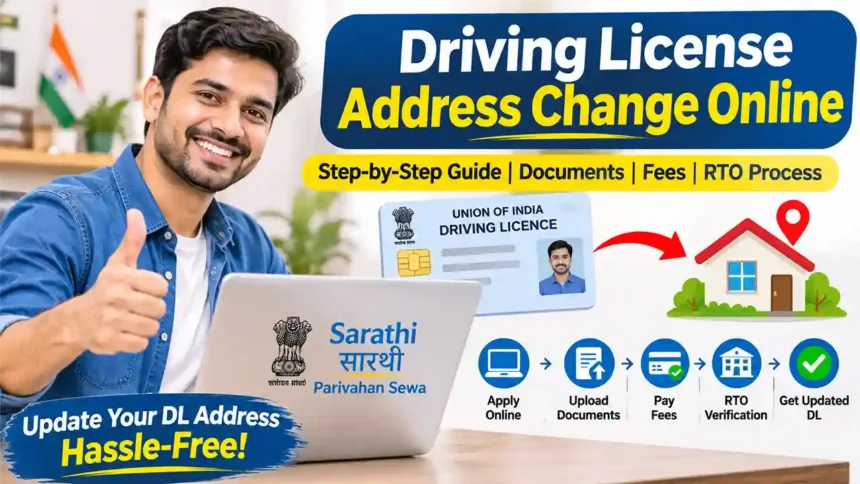
Have you recently changed your residential address? If your old address is printed on your Driving Licence (DL), you can apply to update it through the official Sarathi Parivahan portal.
In this guide, we explain the complete process of Driving License Address Change Online in India, including online application, OTP verification, new address entry, document upload, fee payment and offline RTO submission.
You will also learn how to submit the original driving licence, complete photograph and signature verification, and receive your updated driving licence by post.
The following step-by-step process follows the described online-plus-offline application procedure. RTO visits, Form requirements, document size limits, postal envelopes and fees can vary according to the state and RTO. Always follow the instructions generated by your application.
Driving Licence Address Change – Overview
| Service Name | Driving Licence Address Change |
| Application Mode | Online + Offline (where required) |
| Official Website | Sarathi Parivahan |
| Address Proof | Aadhaar Card or other accepted proof |
| Existing DL | Original Driving Licence |
| Fee | As displayed on the portal (₹500 in the referenced process) |
| Document Upload | JPEG, JPG or PDF as permitted |
| Final Submission | Concerned RTO, if instructed |
| Delivery | Postal delivery, where applicable |
| Expected Time | Approximately 1–2 weeks in the referenced case after RTO processing |
Documents Required for Driving License Address Change
Before applying online, arrange the following documents:- Original Driving Licence: Your existing driving licence.
- Aadhaar Card: For verification of your new residential address, if accepted by your RTO.
- Registered Mobile Number: To receive OTP for online verification.
- Application Form: Form 2 or the application form generated through the portal.
- Form 1: Physical fitness self-declaration, where required.
- Payment Receipt: Proof of successful online fee payment.
- Registered Envelope: If requested by your RTO for postal delivery.
The referenced process specifies JPEG, JPG or PDF files with a maximum size of 500 KB per document. Actual file-size limits and required document categories depend on the selected state portal.
How to Change Address in Driving License Online?
Follow the complete step-by-step procedure below to apply for a driving licence address change through the Parivahan website.
Step 1: Visit the Official Parivahan Website
First, open the official Sarathi Parivahan website using the link below.
Sarathi Parivahan Official Portal
Open Official Website ↗After opening the website:
- Select your state from the state selection list.
- Go to Online Services.
- Select Driving Licence Related Services or the equivalent state-specific menu.
- Click on Apply for Change of Address or open Services on DL.
The available menu may differ depending on your state.
Step 2: Enter Your Driving Licence Details
After selecting the address-change service, you will be redirected to the application instructions page.
Read the instructions and click on Continue. Now enter the following details:
- Driving Licence Number
- Date of Birth
- Captcha Code
Click on Get DL Details to retrieve your driving licence information.
Your existing licence details, such as name, photograph and registered address, will be displayed on the screen. Check all information carefully and confirm that the licence belongs to you.
Select the concerned RTO office where your application will be processed, if the option is available.
Step 3: Verify Your Mobile Number Through OTP
During the application process, you may be asked to update or confirm your mobile number and email address.
- Enter your mobile number.
- Enter your email ID, if requested.
- Click on Generate OTP or Send OTP.
- Check your registered mobile number.
- Enter the OTP received on your phone.
- Submit the OTP for verification.
After successful verification, proceed to the next stage of the application.
Step 4: Select the Address You Want to Change
Now select which address you want to update in your driving licence.
Generally, the following options are available:
Update current residential address.
Update permanent residential address.
Update both addresses.
Select the appropriate option according to your requirement.
Step 5: Enter Your New Address Details
After selecting the address type, enter your new residential address in the application form.
Fill in the required details, such as:
- House Number
- Street or Locality
- Village or Town
- District
- Tehsil or Subdivision
- Landmark (optional)
- State
- PIN Code
If your present and permanent addresses are the same, use the Copy Address option if available.
Check the spelling, district and PIN code carefully before proceeding.
Step 6: Complete the Physical Fitness Self-Declaration
In the next step, the portal may ask you to complete a physical fitness self-declaration.
This declaration generally relates to your physical fitness and eyesight.
Read the questions carefully and provide the correct answers. For example, you may be asked whether you have any eyesight-related problems or other specified medical conditions.
Complete the required declaration and submit the form.
Note: Form 1 is a self-declaration of physical fitness. Form 1A is a separate medical certificate and is required only in applicable circumstances. Do not confuse the two forms.
Step 7: Complete the Organ Donation Declaration
In the referenced application workflow, an additional declaration regarding organ donation may appear.
You may be asked whether you wish to donate your organs after accidental death.
- Select Yes if you wish to indicate your preference for organ donation.
- Select No if you do not wish to indicate this preference.
Choose your preference and continue with the application. This declaration should not be confused with the mandatory eligibility requirements for changing your address.
Step 8: Upload Required Documents
Now upload the documents required for your driving licence address change application.
The referenced process requires two important documents:
- Address Proof: Upload your Aadhaar Card or another accepted address proof showing your new address.
- Existing Driving Licence: Upload a scanned copy of your original driving licence if requested.
Follow these document upload instructions:
- Use JPEG, JPG or PDF format as permitted.
- Keep the file size within the displayed limit (500 KB in the referenced process).
- Ensure the document is clear and readable.
- Select the correct document type before uploading.
- Confirm that the upload is successful.
Step 9: Pay the Driving Licence Address Change Fee
After uploading the documents, proceed to the fee payment section.
In the referenced process, the applicant pays ₹500 through the available online payment gateway.
Depending on the state, available payment options may include:
- Debit Card
- Credit Card
- Net Banking
- Other available online payment methods
Complete the payment and wait for the confirmation message.
₹500 is the fee stated in the supplied application reference, not a confirmed nationwide rate. The central fee schedule and additional state-level charges can differ. Check the actual payable amount on Sarathi before making payment. Save and print the payment receipt.
Step 10: Download and Print the Application Forms
After successful payment, download the application documents and payment receipt.
Print the required forms for submission at the RTO, where an offline visit is instructed.
Keep the following documents ready:
- Application Form (Form 2 or generated application form)
- Form 1 (Physical Fitness Self-Declaration, if generated or required)
- Online Payment Receipt
- Aadhaar Card or other address proof
- Original Driving Licence
- Registered envelope, if required by your RTO
Step 11: Visit the RTO for Physical Document Submission
After completing the online application, the next step in the referenced procedure is to visit the selected Regional Transport Office (RTO) for physical document verification.
Carry the printed forms and original documents with you.
In the described process, the applicant needs to carry:
- Printed application form.
- Form 1, if required.
- Online payment receipt.
- Original Aadhaar Card or accepted address proof.
- Original Driving Licence.
- Registered envelope with your new address and phone number, if instructed.
At the RTO, the officials may verify your documents and application details.
Your photograph and signature may also be captured for issuing the updated driving licence.
Submit the required documents according to the RTO instructions and complete the verification process.
The referenced procedure does not require a prior appointment. However, appointment requirements differ between RTOs. Check your application acknowledgement or contact your RTO before visiting.
Step 12: Receive Your Updated Driving Licence by Post
After successful verification and approval by the RTO, your updated driving licence will be processed and printed.
In the referenced process, the new driving licence is dispatched to the applicant’s new residential address using the registered envelope submitted at the RTO.
The expected delivery time is approximately 1 to 2 weeks after RTO submission and approval in this particular process. Actual delivery may take longer depending on printing, dispatch and postal services.
Keep your application number and payment receipt safe until you receive the updated driving licence.
How to Check Driving Licence Address Change Status Online?
You do not need to visit the RTO repeatedly to check your application progress. You can track your driving licence address-change application online.
- Visit the official Sarathi Parivahan website.
- Select your state.
- Click on Application Status.
- Enter your Application Number.
- Enter your Date of Birth if requested.
- Submit the details to view the application status.
You can check whether your application is pending, approved or processed. If the licence has been dispatched, contact your RTO for postal tracking details if they are not available online.
Driving Licence Address Change – Application Timeline
Here is an example of the application timeline based on the supplied applicant experience:
Online application for driving licence address change submitted.
Visited the RTO for physical document submission and photograph capture.
Documents approved and updated driving licence printed.
Updated driving licence delivered to the new residential address by post.
Note: This is an example timeline from an individual application, not a guaranteed government processing schedule.
Frequently Asked Questions (FAQs)
1. How can I change my address on my driving licence online?
Visit Sarathi Parivahan, select your state, open Services on Driving Licence, enter your DL number and date of birth, and select Change of Address. Complete the application, upload documents and pay the applicable fee.
2. Can I change my driving licence address from one state to another?
Yes. You can apply after moving to another state through the applicable Sarathi service. The new licensing authority may require additional verification or documents from your previous RTO.
3. How much is the fee for driving licence address change?
The supplied reference mentions ₹500. However, the actual amount varies according to central fees and state-level charges. Check the final amount displayed on the Sarathi portal.
4. Is Aadhaar Card mandatory for changing the DL address?
Aadhaar is one commonly accepted address proof. Other documents may also be accepted depending on the state and RTO requirements.
5. Do I need to submit my original driving licence at the RTO?
In the referenced offline procedure, the original driving licence is carried for verification and submission. Follow the instructions given by your concerned RTO.
6. Is a registered envelope required for driving licence address change?
A registered envelope with the new address and mobile number is required in the described application procedure. However, this is not a universal requirement. Check your RTO’s postal delivery instructions.
7. Is an RTO visit compulsory after applying online?
Not in every state. Some states provide contactless or faceless services, while others require physical document submission and photograph or signature capture.
8. How long does it take to receive the updated driving licence?
In the referenced process, delivery takes approximately 1–2 weeks after RTO processing. Actual delivery time depends on the concerned authority and postal service.
9. Can I change both present and permanent addresses?
Yes. Select Present Address, Permanent Address or Both Addresses according to your requirements and the options available on the portal.
10. What should I do if my driving licence details are not showing on Sarathi?
Your old licence records may not have been migrated to the online database. Contact your concerned RTO with your original driving licence for assistance.
11. What if my payment is successful but the application is pending?
Check the payment status and application status on Sarathi. If the application is not updated, contact the concerned RTO or portal helpdesk with your transaction details.
12. Can I check my driving licence address change status online?
Yes. Select Application Status on the Sarathi portal and enter your application number and date of birth to view the latest available status.
Watch Driving Licence Address Change Video
For a practical demonstration of the online application and RTO submission process, watch the following video:
Conclusion
Changing your address on a driving licence is a straightforward process through the Sarathi Parivahan portal. Applicants can complete the online application, verify their mobile number through OTP, enter their new address, submit the required declarations, upload supporting documents and pay the applicable fee.
Depending on the selected state and RTO, applicants may also need to visit the concerned office for physical document verification, photograph and signature capture.
After approval, the updated driving licence is processed for delivery according to the RTO’s procedure. Keep your application number and payment receipt safe so you can track the application until your new driving licence arrives.
Change Your Driving Licence Address Online
Apply through the official Sarathi Parivahan portal.
Apply Online Now ↗Important Official Links
- Sarathi Parivahan – Driving Licence Services
- Parivahan Sewa Official Website
- West Bengal Transport Department
- Official Parivahan FAQs