Best Biometric Device for CSC in India
If you run a CSC centre or cyber cafe, your biometric device is the most important tool on your desk. Aadhaar services, e-KYC, AEPS banking, SIM verification, DigiLocker, PAN, and many government portals all depend on one thing: a fingerprint or iris scanner that works on the first scan. A cheap or uncertified device means failed authentications, angry customers, and lost commission.
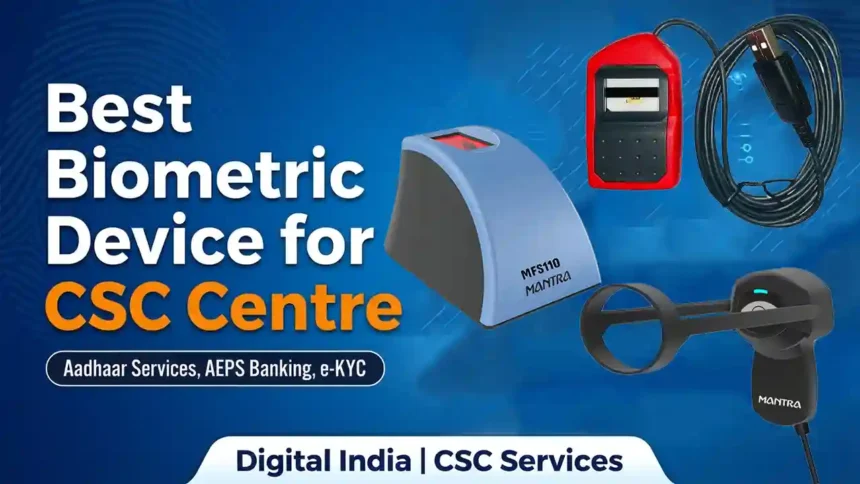
In this post we review three popular, STQC-certified L1 registered devices: the Mantra MFS 110 L1, the Morpho MSO 1300 E3 RD L1, and the Mantra MIS 100 V2 Iris Scanner. We explain why each one is a good choice, where it falls short, and which one suits your centre.
Table of Contents
- Why Biometric Device Quality Matters for a CSC Centre
- Quick Comparison Table
- Mantra MFS 110 L1 Review
- Morpho MSO 1300 E3 RD L1 Review
- Mantra MIS 100 V2 Iris Scanner Review
- Which Device Should You Buy?
- Buying Guide: What to Check Before You Buy
- Setup and Maintenance Tips
- Frequently Asked Questions
- Final Verdict
Why Biometric Device Quality Matters for a CSC Centre
A CSC centre handles dozens of biometric authentications every day. A good device gives you:
- Higher success rate: fewer “capture failed” and “authentication failed” errors.
- Faster service: more customers served per hour, which means more income.
- Compliance: L1 registered devices with a valid RD (Registered Device) service are required for Aadhaar authentication and most banking services.
- Durability: the scanner is touched hundreds of times a week, so build quality matters.
Always buy a device that is L1 certified and supported by your service provider (CSC, DigiPay, your AEPS or banking partner). Check this before you pay.
Quick Comparison Table
| Feature | Mantra MFS 110 L1 | Morpho MSO 1300 E3 | Mantra MIS 100 V2 |
|---|---|---|---|
| Type | Fingerprint | Fingerprint | Single Iris |
| Certification | L1 (RD) | L1 (RD) | L1 (RD) |
| Connection | USB | USB | USB |
| Best For | Everyday CSC work | Heavy, premium use | Worn fingerprints, iris KYC |
| Budget | Value for money | Mid to premium | Premium |
| Our Rating | 4.5 / 5 | 4.4 / 5 | 4.2 / 5 |
Prices change often on Amazon, so check the latest price using the buttons below. Always confirm the exact model and RD service support before ordering.
1. Mantra MFS 110 L1 Biometric Single Fingerprint Scanner

Overview: The Mantra MFS 110 L1 is one of the most widely used fingerprint scanners in Indian CSC centres, banking points, and cyber cafes. It is a compact USB device with an STQC-certified L1 registered device service, built for Aadhaar authentication, e-KYC, and AEPS transactions.
Why It Is Best
- Widely supported: works with most CSC, banking, AEPS, and government portals, so you rarely face compatibility problems.
- L1 certified: meets the latest Aadhaar authentication requirements.
- Value for money: one of the most affordable L1 devices from a trusted Indian brand.
- Easy setup: plug in the USB cable, install the RD service, and start working.
- Easy to find help: a large user base means plenty of video guides, driver support, and service centres.
- Compact design: takes little desk space and is easy to carry for camp work.
Drawbacks
- Dry, worn, or very oily fingers can still give poor captures. You need to clean the sensor and the finger often.
- The RD service needs periodic updates and a fresh device registration, which can confuse beginners.
- Sensor surface can get scratched if you are careless, so a cover is a good idea.
- Only fingerprint, so it cannot help customers with no readable fingerprints.
Best for: new CSC centres, cyber cafes, and small shops that want one reliable, affordable L1 fingerprint scanner.
2. Morpho MSO 1300 E3 RD L1 Fingerprint Biometric Scanner

Overview: The Morpho MSO 1300 E3 is a premium fingerprint scanner from the Morpho (now IDEMIA) family, a global name in biometrics. It is an L1 registered device designed for secure Aadhaar authentication and is popular with busy centres that need a sturdy, dependable scanner.
Why It Is Best
- Trusted global technology: Morpho/IDEMIA is known for high-quality fingerprint sensors used worldwide.
- Good capture quality: many users report fewer re-scans, even for slightly difficult fingers.
- Sturdy build: made for all-day use in a busy centre.
- L1 RD certified: accepted for Aadhaar-based services and most partner platforms.
- Professional look: gives your centre a reliable, premium impression.
Drawbacks
- Usually costs more than the Mantra MFS 110 L1.
- The RD service must be installed and kept up to date, and setup can take some patience for first-time users.
- Some portals or older software may need specific RD service versions, so check with your service provider first.
- Support and service centres can be fewer than for Mantra in some towns.
Best for: busy CSC centres, banking points, and shops that handle many authentications daily and want a premium scanner.
3. Mantra MIS 100 V2 Single Iris Scanner
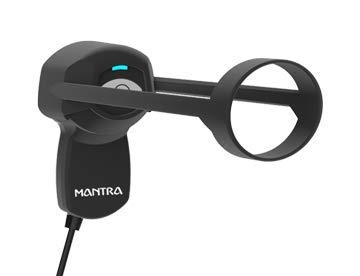
Overview: The Mantra MIS 100 V2 is a USB single iris scanner that authenticates a person by scanning the iris of one eye. It is a great backup (and sometimes a main tool) for customers whose fingerprints do not scan well, such as elderly people, labourers, farmers, and people who work with their hands.
Why It Is Best
- Solves the worn fingerprint problem: iris authentication does not depend on fingertip condition.
- Contactless: the customer does not touch a sensor, so it stays cleaner and lasts longer.
- High accuracy: the iris is a very unique biometric trait.
- More services, more customers: you can serve people other centres turn away, which builds trust and repeat business.
- L1 RD certified: accepted for Aadhaar iris authentication where supported.
Drawbacks
- More expensive than a basic fingerprint scanner.
- Not every service or portal accepts iris authentication, so it cannot fully replace a fingerprint scanner.
- Customers need to be guided to position their eye correctly, so there is a small learning curve.
- Glasses, cataract, bright light, or eye conditions can affect capture. Customers may need to remove glasses.
Best for: centres that already own a fingerprint scanner and want to add iris authentication for customers with poor fingerprints.
Which Device Should You Buy?
| Your Situation | Our Pick |
|---|---|
| Just starting a CSC centre or cyber cafe | Mantra MFS 110 L1 |
| Busy centre with heavy daily authentication | Morpho MSO 1300 E3 |
| Many elderly or manual-labour customers | Mantra MIS 100 V2 Iris (plus a fingerprint scanner) |
| Want to offer every service | One fingerprint scanner + one iris scanner |
Our simple advice: start with a fingerprint scanner, and add an iris scanner once your centre grows. Having both means fewer rejected customers and more income.
Buying Guide: What to Check Before You Buy
- L1 certification: always choose an L1 registered device. Older L0 devices are being phased out for many services.
- Service provider support: confirm that your CSC, AEPS, or banking partner supports the device and its RD service.
- Operating system: check that the RD service supports your Windows version.
- Seller and warranty: buy from an authorised seller and keep the bill and warranty card.
- Genuine product: a fake or refurbished device can fail registration, so check the box seal and serial number.
- Customer reviews: read recent reviews for real-world capture quality and support experience.
Setup and Maintenance Tips
- Install the latest RD service from the official manufacturer website only.
- Complete the device registration with your service provider if required.
- Plug the scanner into a direct USB port on the computer, not a weak hub.
- Clean the sensor gently with a soft, dry cloth. Avoid harsh chemicals.
- Ask customers to wipe their fingers if they are too dry, wet, or dirty.
- Place the device away from direct sunlight, which is especially important for iris scanners.
- Keep a dust cover on the device when not in use.
- Update the RD service when a new version is released.
Frequently Asked Questions
Which is the best biometric device for a CSC centre?
For most centres, the Mantra MFS 110 L1 is the best balance of price, support, and reliability. The Morpho MSO 1300 E3 is a strong premium alternative.
What does L1 mean in a biometric device?
L1 is the higher security level for registered biometric devices under UIDAI rules, where sensitive processing and encryption happen inside the device itself. It is required for many Aadhaar authentication services.
Do I need an iris scanner as well?
It is not required, but it is very useful. If many of your customers have faded fingerprints, an iris scanner lets you serve them without repeated failures.
Can I use one device for all services?
A fingerprint scanner covers most services. Some portals also accept iris authentication. Always check which biometric your service provider supports.
Why does my fingerprint scanner keep failing?
Common reasons are a dirty sensor, dry or wet fingers, an outdated RD service, a weak USB port, or an unregistered device. Clean the sensor, update the RD service, and try again.
Is it safe to buy biometric devices online?
Yes, if you buy from an authorised seller, keep the invoice, and check that the product is sealed and genuine.
Final Verdict
A good biometric device pays for itself quickly through faster service and fewer failed transactions. Here is our summary:
- Best Overall: Mantra MFS 110 L1
- Best Premium Fingerprint Scanner: Morpho MSO 1300 E3 RD L1
- Best for Difficult Fingerprints: Mantra MIS 100 V2 Iris Scanner
Disclosure: This post contains affiliate links. If you buy through them, we may earn a small commission at no extra cost to you. Product features, prices, and availability can change, so always verify the details on the Amazon product page and with your service provider before purchasing.