Best Laptop or Desktop for CSC Centre and Cyber Cafe in India
🌐 READ IN YOUR LANGUAGE
🇬🇧 Select Language in Menu
🇮🇳 मेनू से भाषा चुनें
🇮🇩 মেনু থেকে ভাষা বেছে নিন
Honest review of 4 laptops and 3 desktops with pros, drawbacks and a clear buying guide.
Choosing the right computer is one of the most important decisions for a CSC centre or cyber cafe. Your system runs government portals, Aadhaar and PAN services, online form filling, scanning, printing, biometric devices and photo work every day. A slow or unreliable computer means waiting customers and lost income.
In this post we compare laptops and desktops, explain which suits your business, and review seven popular models with their strengths, drawbacks and the type of owner each one fits.
Note: Specifications, RAM, storage and prices vary between variants and change often. Always confirm the exact configuration on the Amazon listing before you buy.
Quick Summary: Our Top Picks
| Category | Product | Best For |
|---|
| Best Laptop (Reliability) | Lenovo V14 | Portable, dependable daily work |
| Best Budget Laptop | HP 15 (i3, 14th Gen) | Low-cost new setup |
| Best Laptop (Speed & Looks) | ASUS Vivobook 15 | Multitasking and photo work |
| Best Value Laptop | Acer Aspire 3 | Extra machines on a budget |
| Best Desktop (Performance) | Core i7 Desktop PC | Busy main counter |
| Best Complete Set | Desktop Computer Set i7 | New cyber cafe seats |
| Best Value Desktop | Core i5 Desktop PC | Most centres, best price-to-performance |
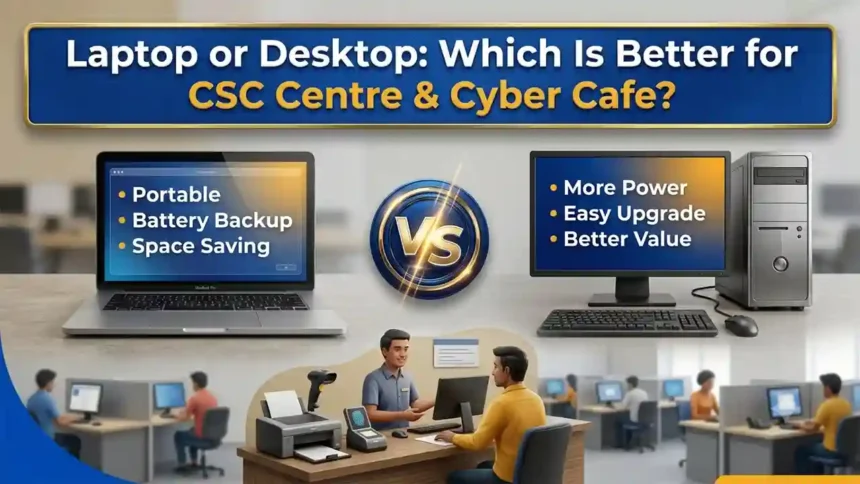
Laptop vs Desktop: Which Is Better for a CSC Centre?
| Feature | Laptop | Desktop |
|---|
| Performance for price | Good | Better: more power per rupee |
| Power cut backup | Built-in battery | Needs a UPS |
| Portability | Excellent: camps and outreach | Fixed to the counter |
| Repair and upgrade | Limited | Easy and cheaper |
| Comfort for long shifts | Smaller screen | Large monitor, full keyboard |
| Space needed | Very little | More desk space |
| Theft risk | Higher | Lower |
Verdict: For a permanent counter or a cyber cafe with several seats, desktops give better value, comfort and easier repair. For a small centre, mobile service or areas with frequent power cuts, a laptop is the smarter choice. The best setup for many owners is a desktop at the main counter plus one laptop as a backup.
Best Laptops for CSC Centre and Cyber Cafe
#1 PickBest for Reliability
Lenovo V14
Lenovo’s V-series is built for business and office use, which is exactly the kind of daily, long-hours work a CSC centre does.
✅ Why It Is Good
- ✔Business-class build that handles all-day use better than many budget home laptops
- ✔Compact 14-inch body is easy to carry for camp or outreach work
- ✔Smooth for browsers, PDF tools, Aadhaar/PAN/voter portals and Excel
- ✔Lenovo has a wide service network across India
⚠️ Drawbacks
- ✖14-inch screen feels small if you work with several tabs for hours
- ✖Basic integrated graphics: not meant for video editing or heavy design
- ✖Check RAM and SSD in the listing; 8 GB RAM and SSD should be your minimum
Best for: Owners who want a dependable, portable laptop for a small CSC counter or mobile service.
#2 PickBest Budget Pick
HP 15 (Intel Core i3, 14th Gen)
A 15.6-inch laptop with a 14th Gen Core i3 processor is plenty for typical CSC tasks and keeps your starting cost low.
✅ Why It Is Good
- ✔Newer 14th Gen Intel i3 gives good everyday speed for form filling, scanning and printing
- ✔Large 15-inch display is comfortable for long typing sessions
- ✔HP service centres and spare parts are easy to find in most districts
- ✔Good value for a first CSC or cyber cafe setup
⚠️ Drawbacks
- ✖i3 can slow down if you run many heavy apps and tabs together
- ✖Plastic body: handle carefully if you carry it often
- ✖Battery life drops quickly under heavy use, so keep it plugged in at the counter
Best for: New CSC owners who want the lowest sensible investment without buying an outdated machine.
#3 PickBest for Speed & Looks
ASUS Vivobook 15
Vivobook 15 is a stylish, slim 15.6-inch laptop that suits a front-desk setup where customers can see your equipment.
✅ Why It Is Good
- ✔Slim, modern design gives a professional look at the counter
- ✔Comfortable full-size keyboard for fast data entry
- ✔Good balance of performance and price for multitasking
- ✔Handy for photo editing, passport-size photos and PDF work
⚠️ Drawbacks
- ✖Service centres are fewer in small towns than HP or Lenovo
- ✖Glossy or thin builds need careful handling
- ✖Verify processor, RAM and storage in the exact model you are buying
Best for: Owners who also do photo, PVC card design and document work and want smoother multitasking.
#4 PickBest Value Alternative
Acer Aspire 3
Acer Aspire 3 is a familiar budget laptop line that covers everyday office tasks at an attractive price.
✅ Why It Is Good
- ✔Affordable, which helps if you want to buy two machines
- ✔Runs web portals, online forms, Word, Excel and PDF tools without trouble
- ✔Large screen and numeric keypad speed up data entry
- ✔Easy to upgrade RAM or storage in many Aspire models
⚠️ Drawbacks
- ✖Build quality is basic compared with business-class laptops
- ✖Speakers and display are average
- ✖Check the exact configuration, since variants differ in RAM and SSD
Best for: Cyber cafe owners who need a low-cost second or third machine for light work.
Best Desktops for CSC Centre and Cyber Cafe
#1 PickBest Performance
Core i7 Desktop Computer PC
A Core i7 desktop gives you the most power for a busy centre running scanners, biometric software, printers and many browser tabs at once.
✅ Why It Is Good
- ✔Strong processor handles heavy multitasking without lag
- ✔Bigger monitor, full keyboard and mouse make long shifts comfortable
- ✔Easy to repair and upgrade: RAM, SSD and parts can be changed separately
- ✔Ideal for the main counter system
⚠️ Drawbacks
- ✖Needs a UPS, because a power cut shuts it down instantly
- ✖Takes more desk space and is not portable
- ✖Higher cost than an i3 or i5 setup
Best for: High-traffic CSC centres with one main workstation doing many services.
#2 PickBest Complete Set
Desktop Computer Set i7
A ready desktop set usually includes the monitor, keyboard and mouse, so you can plug in and start work quickly.
✅ Why It Is Good
- ✔Everything arrives together, so setup is simple
- ✔i7 power suits photo editing, design and scanning
- ✔One seller handles warranty for the whole set
- ✔Good for adding extra seats in a growing cyber cafe
⚠️ Drawbacks
- ✖Included accessories may be basic; consider a better keyboard and mouse
- ✖Compare monitor size and RAM carefully before ordering
- ✖Check warranty terms and seller details in the listing
Best for: Owners setting up a new cyber cafe who want several seats quickly.
#3 PickBest Value Desktop
Core i5 Desktop PC
Core i5 is the sweet spot for most centres: fast enough for daily CSC work without the cost of an i7.
✅ Why It Is Good
- ✔Great balance of price and performance
- ✔Handles all government portals, forms and PDF work smoothly
- ✔Lower power use than higher-end systems
- ✔Perfect for browsing seats in a cyber cafe
⚠️ Drawbacks
- ✖Not ideal if you edit video or run heavy design software all day
- ✖Needs a UPS and a stable internet connection
- ✖Verify RAM (8 GB or more) and SSD in the model you choose
Best for: Most CSC centres and cyber cafes looking for the best price-to-performance ratio.
Buying Checklist for CSC and Cyber Cafe Owners
- ✔RAM: 8 GB minimum, 16 GB if you run photo or design tools.
- ✔Storage: SSD only, 256 GB or more. Avoid old hard-disk-only systems.
- ✔Processor: i3 for light work, i5 for most centres, i7 for heavy use.
- ✔Windows licence: Choose a system with genuine Windows preinstalled where possible.
- ✔UPS: Keep a UPS with every desktop to protect work and hardware.
- ✔Warranty: Prefer brands with service centres near you and keep the invoice.
- ✔Ports: Check USB ports for biometric devices, scanners and printers.
Final Verdict
There is no single best computer for everyone, but these picks cover almost every situation:
- Best overall laptop: Lenovo V14 for reliability.
- Best budget laptop: HP 15 with 14th Gen Core i3.
- Best desktop for most owners: Core i5 Desktop PC for price-to-performance.
- Best for heavy work: Core i7 Desktop Computer PC.
Match the machine to your daily workload, add a UPS, and choose SSD storage with at least 8 GB RAM. That small checklist will save you far more time and money than chasing the highest specification.
Frequently Asked Questions
Is a laptop or desktop better for a CSC centre?
For a fixed counter, a desktop gives more power and comfort for the price. A laptop is better when space is limited, you do outreach or camp work, or power cuts are frequent, since the battery works as a built-in backup. Many centres use one desktop as the main system and one laptop as a backup.
How much RAM and storage do I need?
Choose at least 8 GB RAM and an SSD (256 GB or more). SSD storage makes boot-up and browser work much faster, and 8 GB RAM keeps many tabs and PDF tools running smoothly.
Is Core i3 enough for Aadhaar, PAN and form-filling work?
Yes. Online portals, PDF tools and printing run well on a modern i3 with 8 GB RAM. Choose i5 or i7 if you also do photo editing, PVC card design or run several busy seats.
Do I need a UPS?
Yes, for desktops especially. A small UPS protects against power cuts and voltage spikes, saves unfinished applications and prevents data loss.
Where should I buy, and what should I check?
Buy from a trusted seller on Amazon, check the exact RAM, SSD and warranty in the listing, read recent customer reviews, and keep the GST invoice for warranty and business records.
Can I use these systems for biometric devices and printers?
Yes. Most RD-service biometric scanners and printers work on Windows laptops and desktops. Always check your device’s driver and OS requirements first.
Affiliate disclosure: This post contains Amazon affiliate links. If you buy through them, we may earn a small commission at no extra cost to you. Prices and availability can change, so please check the listing before purchase.